

Ergonomic Office Chair Company Guide to Choosing a Chair That Supports Your Spine
2026-10-05
Your spine has a long memory—ignore it for eight hours a day and it will remind you in ways you'd rather avoid. The right ergonomic office chair isn't about fancy features; it's about matching the chair's support to how you actually sit. In this guide from OFCJNS, we break down what to look for, from lumbar curve alignment to seat depth, so you can choose a chair that keeps you comfortable long after the initial sit test.
Why Your Spine Dislikes Most Office Chairs
Most office chairs push your pelvis into a backward tilt and round your lower back into a C-shape. That position stretches spinal ligaments and muscles unevenly, while the discs between vertebrae get squeezed at the front and bulge toward the back. You might not notice it in the first hour, but by mid-afternoon the stiffness and dull ache are your spine reminding you it was never meant to hold a seated curve for eight hours.
The problem gets worse because many chairs offer lumbar support that feels good for ten minutes but actually does the work your core should be doing. Your deep stabilizers switch off, and your spine ends up depending on a padded bump instead of its own support system. Over time, that dependence leaves the small muscles along your vertebrae weak and reactive, so the moment you sit anywhere else—car, couch, café—your back complains even sooner.
Finding the Lumbar Sweet Spot: It’s Not Just Cushion
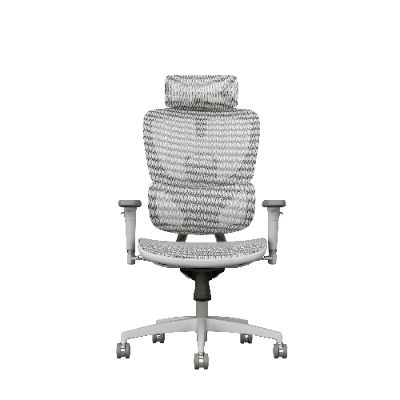
The assumption that a thicker cushion solves lower back pain misses the point entirely. Lumbar support only works when it lands in the precise zone between the top of the pelvis and the bottom of the ribcage. Too much padding in the wrong place pushes the pelvis into posterior tilt, flattening the natural lordotic curve and forcing the discs to bear uneven load. The sweet spot is not about softness; it's about matching the support's apex to the apex of your lumbar curve.
A fixed, overstuffed cushion can feel good for ten minutes, then become a source of pressure. Because sacral slope and lordosis depth vary from person to person, the right height and prominence need fine adjustment. When the support sits too low, it acts on the sacrum rather than the lumbar spine; too high, and it digs into the thoracolumbar junction. The goal is a contact patch that spreads pressure across the erector spinae without creating a single hot spot.
Try this: sit tall, reach back, and locate the point where your belt line meets your spine. The center of the support should rest two to three finger-widths above that line, with just enough forward pressure to fill the hollow behind your waist. If you feel like you're being launched out of the seat, dial it back. If your lower back still hovers off the surface, you haven't found it. Once the position is right, even modest padding outperforms a plush cushion misplaced by an inch.
Seat Depth and the Two-Finger Rule
Most people don’t think about seat depth until their legs start tingling halfway through the afternoon. A chair that’s too deep forces you to perch on the front edge, leaving your lower back unsupported, while one that’s too shallow makes your thighs do all the work. The two-finger rule gives you a quick, no-tools way to check: sit all the way back against the chair, then try sliding two or three fingers into the space between the front edge of the seat and the back of your knee. That gap should be roughly the width of your fingers—less than two fingers usually means the seat is too deep, and more than three means it’s too shallow.
Getting this distance right matters more than it might seem. If the seat cuts into the back of your knees, it can compress blood vessels and nerves, leading to numbness, swelling, or that restless need to keep shifting position. Over time, you may end up slouching forward just to relieve the pressure, which defeats the purpose of any ergonomic chair. On the other hand, a seat that doesn’t extend far enough under your thighs concentrates your weight on a smaller area, making your sit bones sore and leaving your legs without proper support. A well-adjusted seat pan spreads the load along your thighs, keeps your feet flat on the floor, and lets your knees bend at a comfortable open angle.
If your chair has a sliding seat pan, adjust it until the two-finger gap feels right, then lock it in place. For fixed-depth chairs, a small back cushion can push you forward, or a footrest can change the angle enough to relieve pressure. Keep in mind that the rule isn’t absolute—taller people may prefer slightly more depth, and shorter users often need less. Recheck the fit whenever you change shoes, adjust your seat height, or switch between chairs. It’s a simple habit that takes a few seconds but can save you from a lot of end-of-day discomfort.
Tilt and Recline: Let Your Discs Breathe
Most chairs force your spine into a single locked position, which keeps pressure on the discs between vertebrae all day. The tilt and recline function changes that by letting your back angle shift through a wide range, so the load moves away from the lumbar region and gives those discs a chance to recover.
When you recline slightly and let the chair support your full back, the discs decompress instead of staying squashed under constant vertical weight. A smooth, controlled tilt also encourages small position changes throughout the day, which keeps fluid moving through the spinal discs and reduces stiffness that builds up in fixed postures.
This isn't just about leaning back for a break. The recline mechanism works with your body's natural need to shift, letting the discs breathe without you having to consciously think about posture corrections every few minutes.
Armrest Height: Start Low, Then Fine-Tune
Most people assume armrests should sit at a height that directly mirrors the desk, but that's where tension creeps in. Begin with the pads dropped to their lowest setting. From there, sit back fully, let your shoulders slump naturally, and bend your elbows to about 90 degrees. Raise the armrests one click at a time until they just barely kiss the underside of your forearms. If you feel any upward push into your shoulders or a need to flare your elbows out, you've gone too far.
The point of this low-start method is to avoid using the armrests as crutches. When they're too high, you end up shrugging without realizing it, which tightens the neck and upper back by the end of the day. By creeping up from the bottom, you're more likely to find the threshold where support exists but your arms still hang comfortably. That slight gap—often no more than a finger's width—keeps the weight off your shoulders without letting your wrists drop.
Fine-tuning comes down to the task in front of you. For typing, keep the armrests level with your desk surface or a touch lower. For reading or using a phone, you can raise them a bit to support your elbows while still keeping your spine against the backrest. Recheck every few weeks, especially if you change chairs, shoes, or desk height. The sweet spot isn't a number; it's the feeling of being able to let your arms go completely dead and have them rest naturally.
The 10-Minute Sit Test Before You Commit
Most people judge a chair by looks, but looks fade after ten minutes of sitting. Instead of rushing, do a 10-minute sit test in the store. Pay attention to how your lower back, thighs, and shoulders feel. If you start shifting around or noticing pressure points before the timer ends, that's a red flag.
Bring your phone or a book and actually sit like you would at home—don't perch. Test the armrest height, seat depth, and lumbar support. A good seat should let you plant your feet flat and keep your knees at a comfortable angle. If the salesperson rushes you, politely ignore; this is your money and your spine.
After the ten minutes, stand up and note any stiffness or numbness. If the chair still feels supportive and you forgot about the time, that's a promising sign. Otherwise, walk away. A brief sit test can save you from months of back pain and buyer's remorse.
FAQ
Start with the backrest height and shape. Your chair should follow the natural S-curve of your spine rather than forcing you into a straight line. Look for a backrest that reaches at least your shoulder blades and has a curve that fits into the small of your back without pushing too hard.
You want adjustable lumbar support that you can move up or down to match the exact curve of your lower back. If it's fixed, test it by sitting all the way back—your lower back should feel gently cradled, not poked. A support that's too aggressive can flatten your natural curve over time.
Yes, and most people ignore it. When you sit back, there should be about two to three fingers of space between the front edge of the seat and the back of your knees. Too much depth makes you slide forward and lose back contact; too little creates pressure points that shift your pelvis out of alignment.
Absolutely. Armrests that are too high push your shoulders up toward your ears, tightening your upper back and neck. Set them so your elbows rest at a 90-degree angle with your forearms parallel to the floor. If they're not adjustable, look for a chair with armrests you can remove or ignore.
Your feet need to rest flat on the floor with your knees at about hip level or slightly lower. That's usually a seat height where your thighs are parallel to the ground. If your chair won't go low enough, use a footrest rather than letting your feet dangle—that dangling pulls your pelvis forward and strains your lower back.
Not for everyone. If you sit upright most of the day, a headrest won't do much. But if you recline often or take short breaks leaning back, a height- and angle-adjustable headrest takes load off your neck and upper spine. Just don't let it push your head forward—that creates the opposite problem.
Aim to shift your posture every 20 to 30 minutes, even if it's just leaning back for a minute or standing up briefly. No chair, no matter how ergonomic, is designed for hours of static sitting. Your spine needs movement to pump nutrients into the discs and prevent stiffness.
Yes, the seat and backrest fabric matter. A breathable mesh back lets you sit without sweating, which keeps you from subtly twisting to cool down. For the seat, firmer foam or a tension-adjustable mesh holds your pelvis stable better than a plush cushion that lets you sink unevenly.
Conclusion
Most office chairs fail the spine because they force a single rigid posture. Cushions pack down, lumbar bumps sit too high or too low, and the seat pan either cuts off thigh circulation or pushes you away from the backrest. To find the lumbar sweet spot, ignore the cushion's thickness and focus on where support actually contacts your back. Adjust the lumbar height until you feel gentle pressure just above the belt line, not in the middle of your ribs. Then slide your hand between the front edge of the seat and the back of your knee. Two or three fingers should fit. More room means the seat is too deep and you will slide forward; fewer means the edge digs in. This two-finger check is faster than any spec sheet.
Recline is not for napping—it is how your discs breathe. Keeping the backrest locked at ninety degrees holds constant compression, while tilting back ten to twenty degrees opens the hip angle and lets spinal fluid move. Look for a chair with synchronized tilt that lets your seat and back move together, and use it during phone calls or reading. Armrests should start low, not high: set them so your elbows rest at ninety degrees without lifting your shoulders, then adjust by half-inch steps after a few days. Before buying, do a ten-minute sit test with your normal work. Do not force good posture; just sit naturally and note if you start shifting, crossing legs, or reaching for a cushion. If the chair still feels invisible after ten minutes, that is a better sign than any lumbar label.
Contact Us
Contact Person: Diff Wang
Email: [email protected]
Tel/WhatsApp: +8613650281199
Website: https://www.ofcmeshchair.com/